This was my final-year project at the University of Sussex (2025/26), supervised by Martin Berger, and I presented it as a 15-minute talk. The full slides are here. The way it times a single instruction is where tickbound started, so this post walks through it one diagram at a time.
The question was narrow. A PTX load instruction can carry one of four cache modifiers, which tell the hardware how to cache the line it fetches. What does each one actually cost, per load, on real hardware?
The short version:
- The deep-learning kernels I measured spend most of their time moving bytes, not doing arithmetic. Only the large matrix multiplies lean towards the compute side.
- On an RTX 3060 Ti, a load served by L1 takes 39 cycles, by L2 about 330, and by DRAM about 533. The step from L1 to L2 is the biggest one in the hierarchy.
- Bypassing L1 with
.cglooks 1.73× slower than the default on a single SM. With all 38 SMs loading at once it is 6.27× slower. - The two instruments I used disagree in exactly one place, and that disagreement turned out to be an L1 bank conflict that neither would have shown on its own.
1. Why AI kernels are slow
| Kernel | SM % | DRAM % |
|---|---|---|
| Add (a + b) | 4 | 95 |
| ReLU | 7 | 93 |
| LayerNorm | 17 | 93 |
| Sum reduction | 8 | 83 |
| Softmax | 37 | 73 |
| Conv 28², 1→32 | 28 | 70 |
| Conv 56², 64→128 | 54 | 54 |
| GEMM 256³ | 37 | 37 |
| Attention (SDPA) | 51 | 44 |
| FlashAttention (Triton) | 21 | 20 |
| GEMM 1024³ | 72 | 60 |
| GEMM 4096³ | 75 | 58 |
NCU on an RTX 3060 Ti (SM86). SM % is compute throughput as a share of its peak, DRAM % is memory bandwidth as a share of its peak. The two peaks are independent.
How to read the table. For each kernel, NCU (NVIDIA's Nsight Compute profiler) reports how busy the compute units were and how busy the memory bus was, each as a percentage of its own maximum. Element-wise kernels like Add and ReLU use 93 to 95 % of the memory bandwidth and almost none of the compute. Only the two large matrix multiplies at the bottom get their compute units above 70 % of peak.
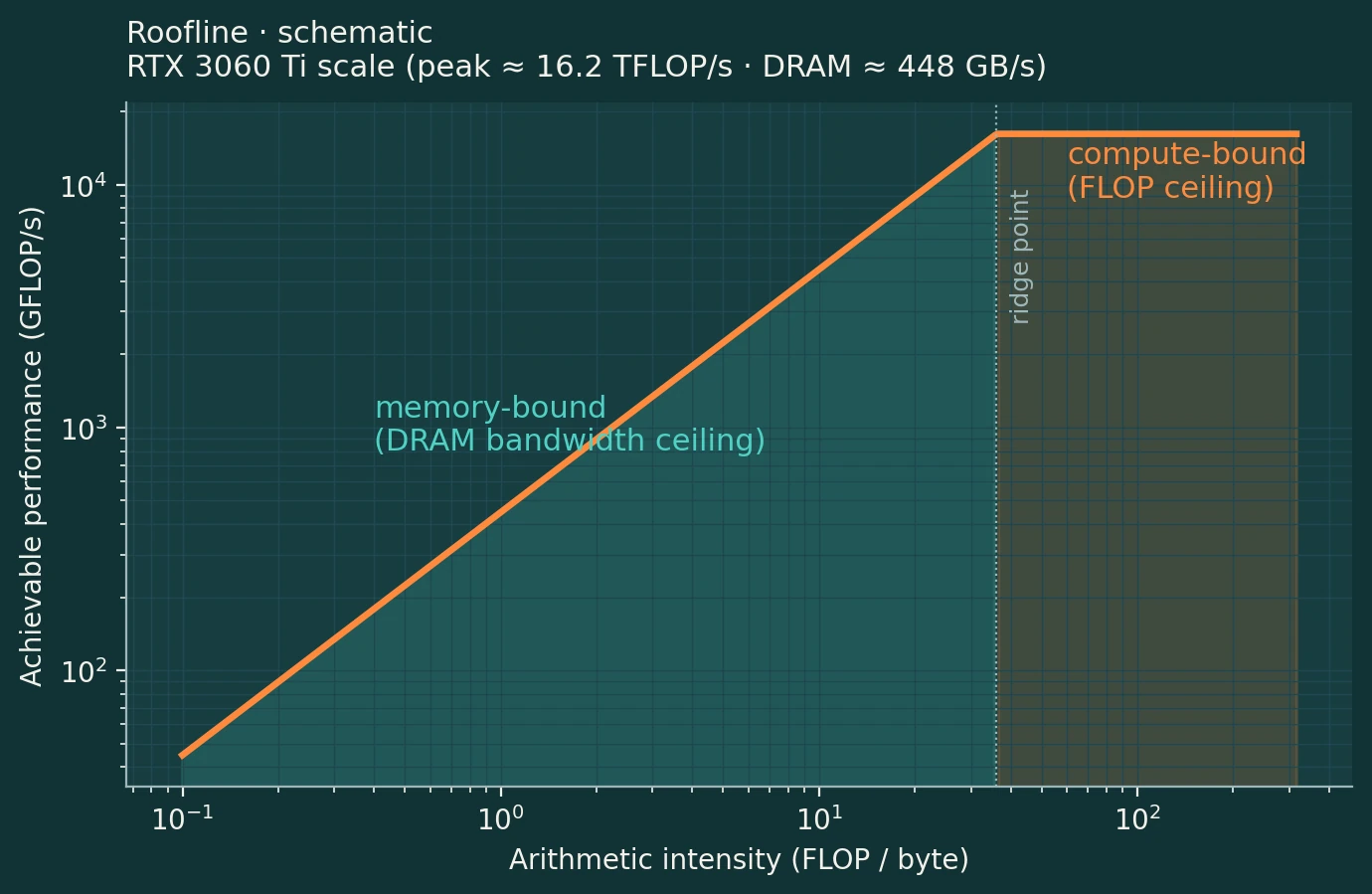
How to read the roofline. The x-axis is arithmetic intensity: how many floating-point operations a kernel does per byte it reads. The y-axis is the performance it can reach. On the sloped part, left of the ridge point, performance is limited by how fast bytes arrive; on the flat part it is limited by arithmetic. With these two peaks the ridge sits at roughly 36 FLOP per byte. An element-wise add does well under one FLOP per byte, so it sits far to the left.
So the useful thing to make cheaper is the load, not the FLOP. That raises the question of what a single load actually costs.
2. The memory tiers
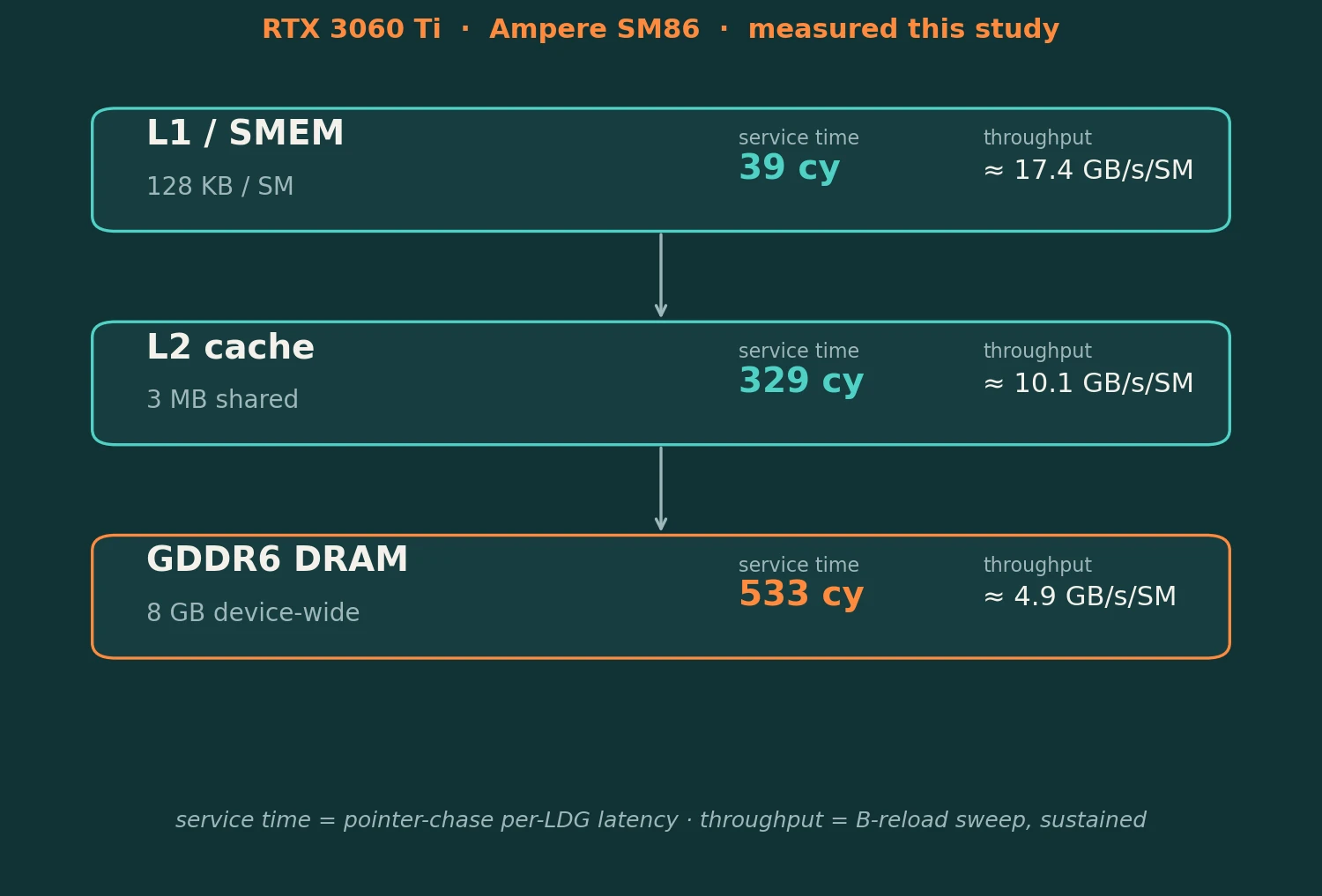
The RTX 3060 Ti (Ampere, compute capability 8.6) has 38 SMs. Each SM has 128 KB of L1 cache, shared with its scratchpad memory. All SMs share one 3 MB L2, and behind that sit 8 GB of GDDR6.
The figure gives two numbers per tier. Service time is how long one load takes when each load depends on the previous one, so nothing overlaps: 39 cycles from L1, 329 from L2, 533 from DRAM. Throughput is the sustained rate per SM from a separate sweep. Going from L1 to L2 multiplies the latency by 8.4, which makes it the biggest single step in the hierarchy. Whether a load stays in L1 matters more than anything else about it.
3. Four ways to load the same value
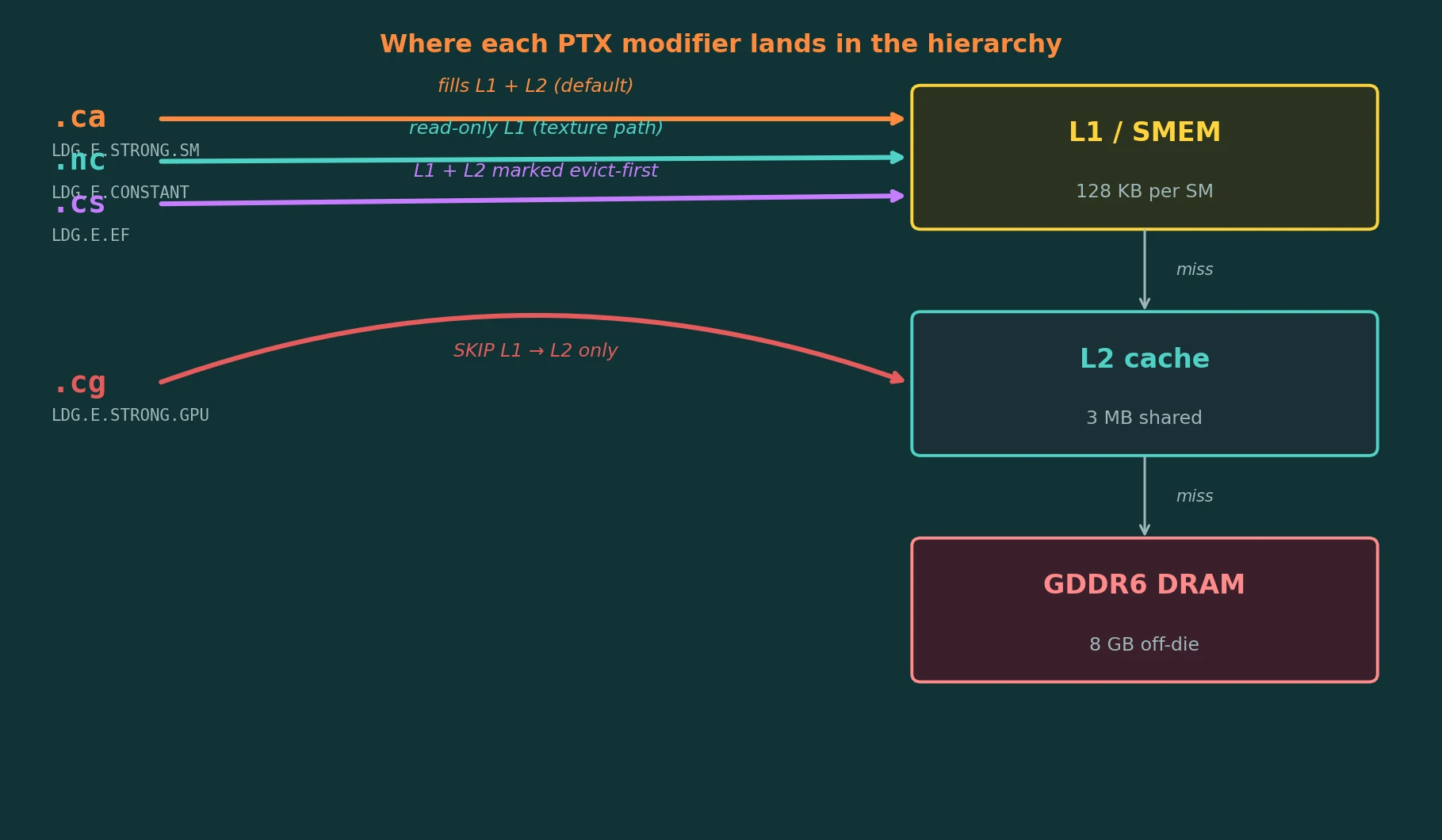
In PTX, NVIDIA's assembly language, the same load can be written four ways by changing one suffix: ld.global.ca, .nc, .cs or .cg.
.ca, cache all, is the default. The line is kept in both L1 and L2..nc, non-coherent, reads through the read-only (texture) path into L1. Compilers only use it when they can prove nothing writes the data during the kernel..cs, cache streaming, keeps the line in L1 and L2 but marks it first to be evicted. It is meant for data that will not be reused..cg, cache global, skips L1 completely and is served from L2.
Each one turns into a different SASS instruction, the machine code the GPU runs. I checked every one with cuobjdump on the RTX 3060 Ti; the opcodes are listed under each name in the figure. In both Triton and CUDA the modifier survives all the way down as a qualifier on the PTX load. Triton's tl.load only exposes some of them, though: .cs is not supported for loads (an open Triton issue), and .nc is not reachable either, so those two needed CUDA.
4. How it started: timing a chain of adds
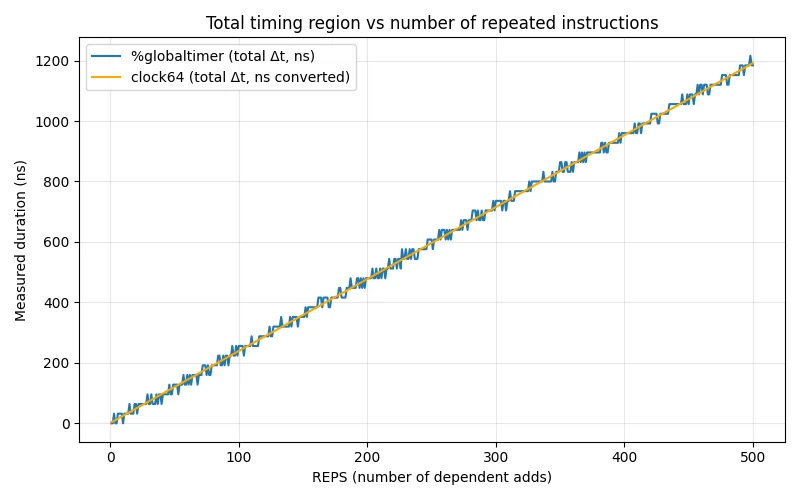
Before timing loads, I had to know the GPU's clocks could be trusted. The simplest test is a chain of additions where each one needs the previous result, so they cannot overlap, timed with two clocks at once: %globaltimer, the GPU's nanosecond timer (blue), and clock64, the SM's cycle counter converted to nanoseconds (orange).
Both lines are straight and lie on top of each other at every chain length, at about 2.4 ns per add. At the card's 1.68 GHz that is about 4 cycles per add, which matches the latency of a dependent floating-point add. The blue line is stepped because the global timer ticks more coarsely than the cycle counter. The two clocks agree, so either can be used.
5. Three instruments, three angles
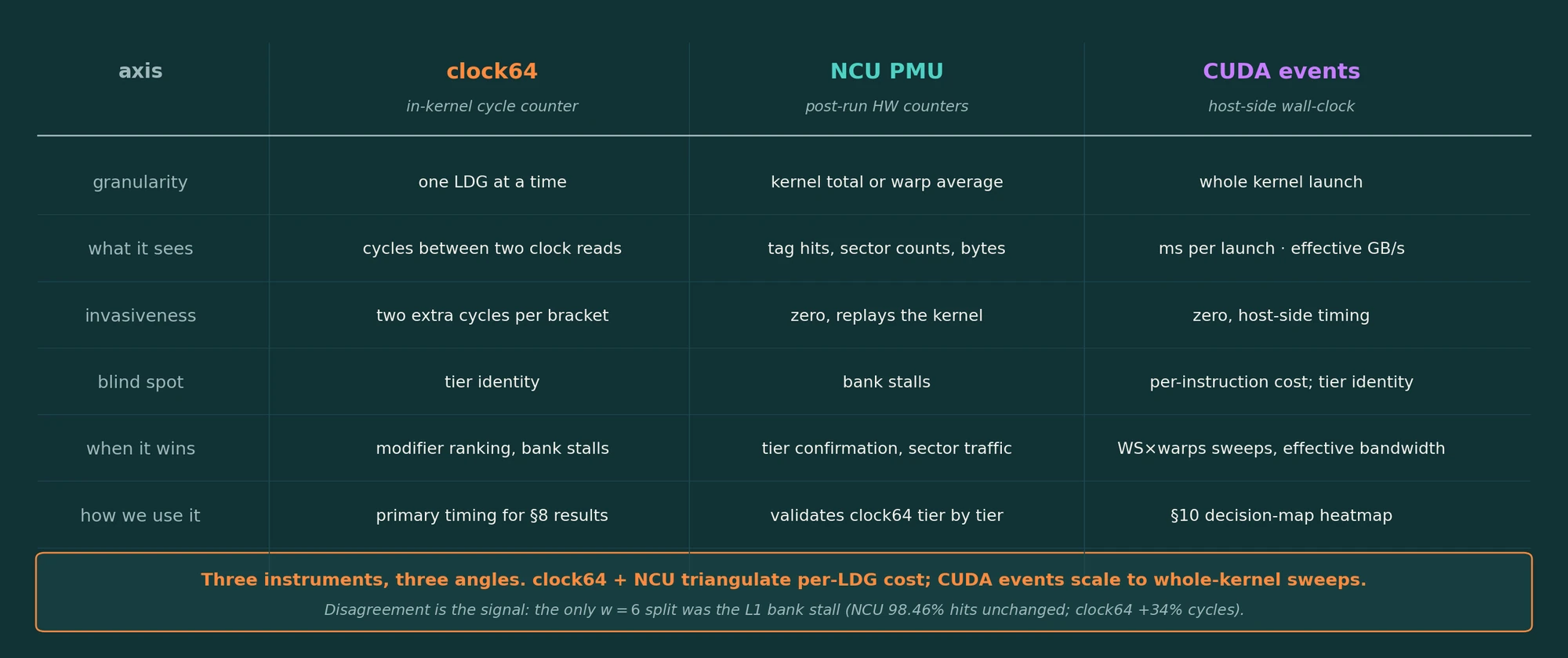
No single tool answers the question, so the project uses three.
clock64runs inside the kernel and times one load at a time. It sees how long, but not which tier served the load.- NCU reads the hardware counters after the run: cache hits, sectors, bytes. It sees which tier was used, but averages thousands of loads into one number and is blind to bank stalls.
- CUDA events time the whole kernel from the host. They are coarse, but cheap enough to sweep thousands of configurations, and they give effective bandwidth.
When they agree, the result stands on two independent signals. When they disagree, the disagreement itself is information, as section 9 shows.
6. The nano-benchmark: two clock reads around one load
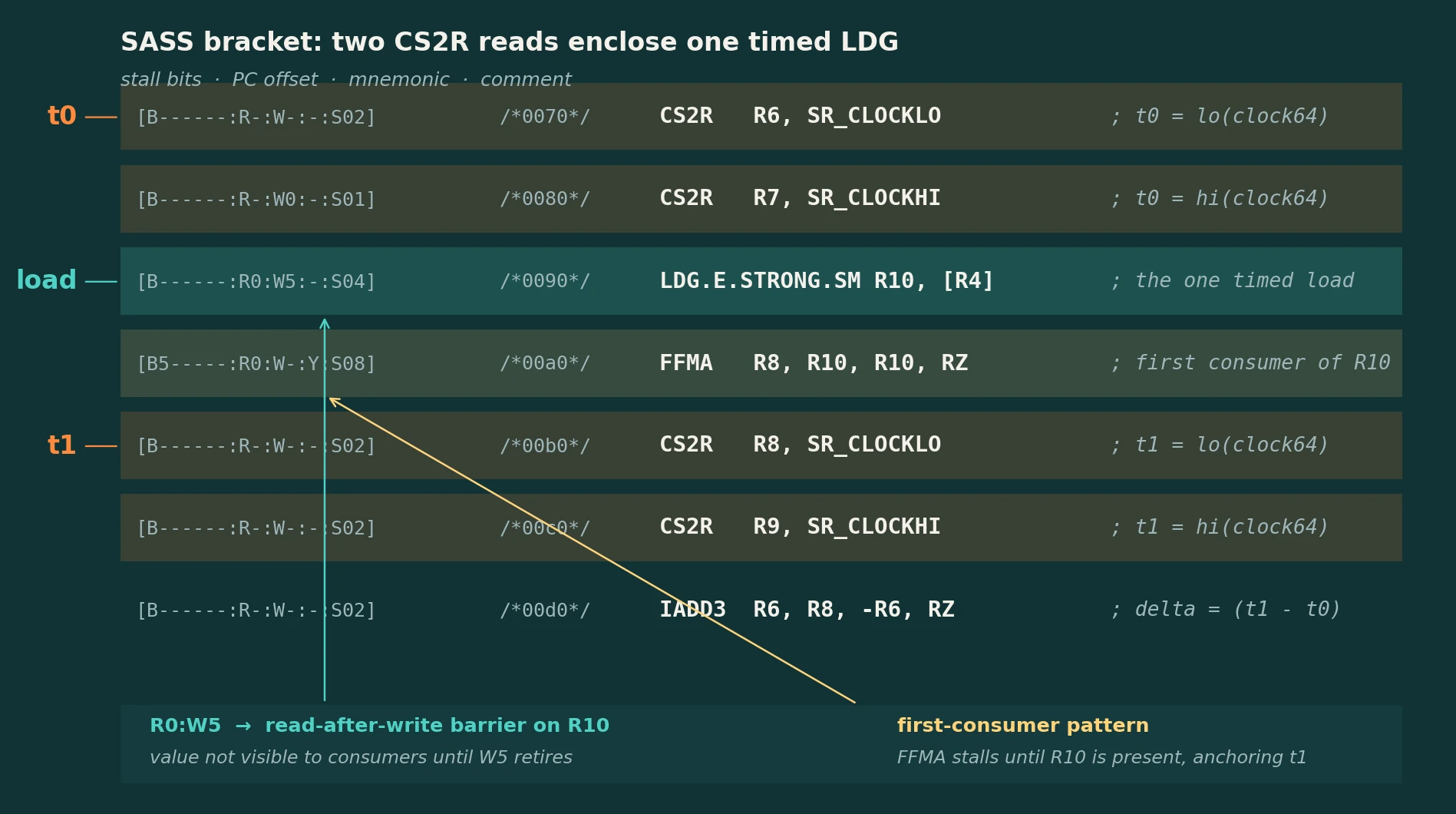
This is the core trick, and it is the same one tickbound uses.
Reading the listing top to bottom. Two CS2R instructions read the low and high halves of the cycle counter into R6 and R7: that is t0. Then comes the one load being timed, LDG ... R10, [R4]. Its control bits (W5) tell the hardware to set barrier 5 when R10 is finally written. Next is an FFMA that uses R10. Its control bits say it must wait on barrier 5 (B5), so it cannot issue until the loaded value has arrived. Only then do the closing CS2R reads run (t1), and an IADD3 computes t1 - t0.
The important part is the consumer. A clock read on its own does not wait for the load before it; without the FFMA, t1 would be taken while the data was still on its way. With the consumer in between, the bracket covers the full time until the data lands in the register.
Put N loads inside the bracket and divide by N. With one load in flight at a time you measure latency; with many in flight, throughput.
7. The hierarchy, measured two ways
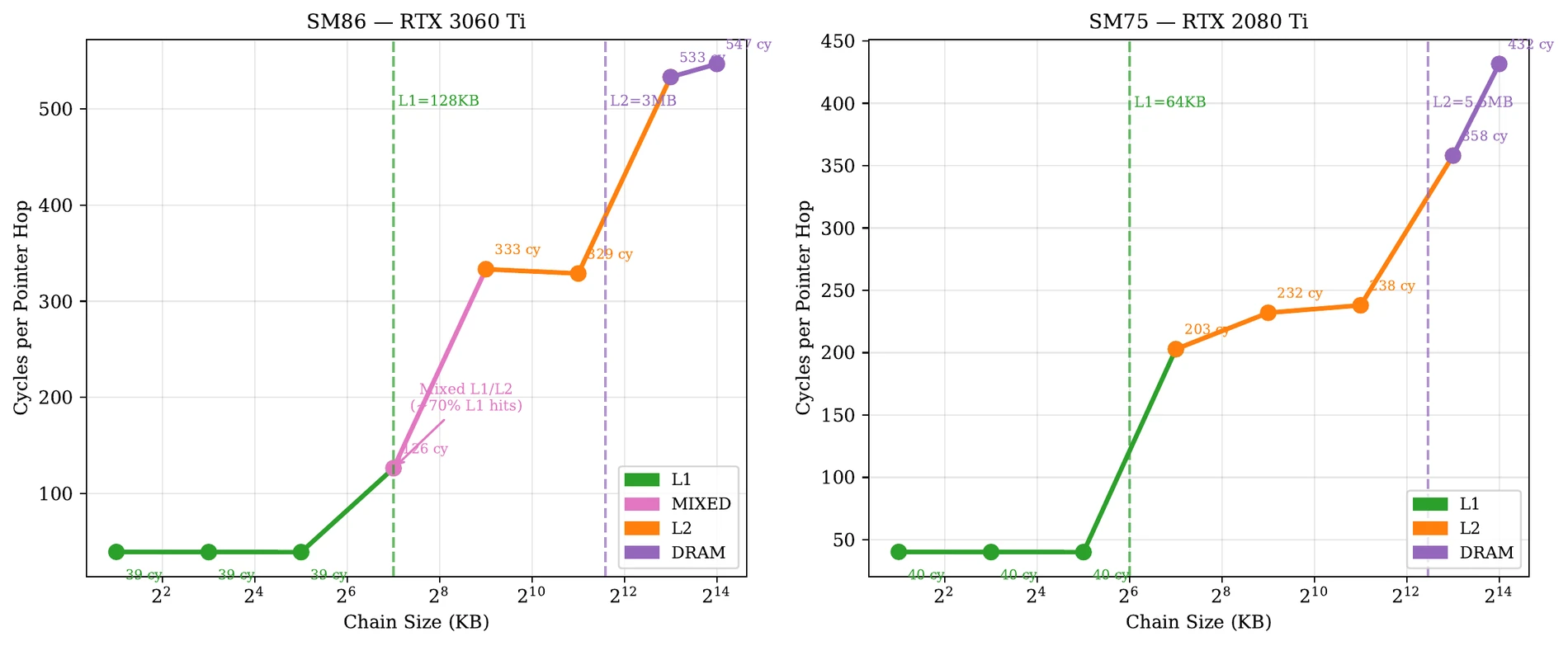
How to read it. A pointer chase follows a linked list: each load gives the address of the next, so every load waits for the previous one. The x-axis is the size of the list, so it also decides which tier the list fits in. The y-axis is cycles per hop. The dashed lines mark the L1 and L2 sizes.
On the RTX 3060 Ti (left), lists up to 32 KB fit in L1 and every hop takes 39 cycles. At 128 KB, the size of L1 itself, about 70 % of hops still hit L1 and the average is 126 cycles. Once the list lives in L2, hops take 329 to 333 cycles, and once it outgrows the 3 MB L2 they take 533 to 547.
The RTX 2080 Ti (right) shows the same staircase, with its edges where its own caches end: a 64 KB L1 and a 5.5 MB L2. Its L1 hit is 40 cycles, its L2 hits 203 to 238, and DRAM 358 to 432.
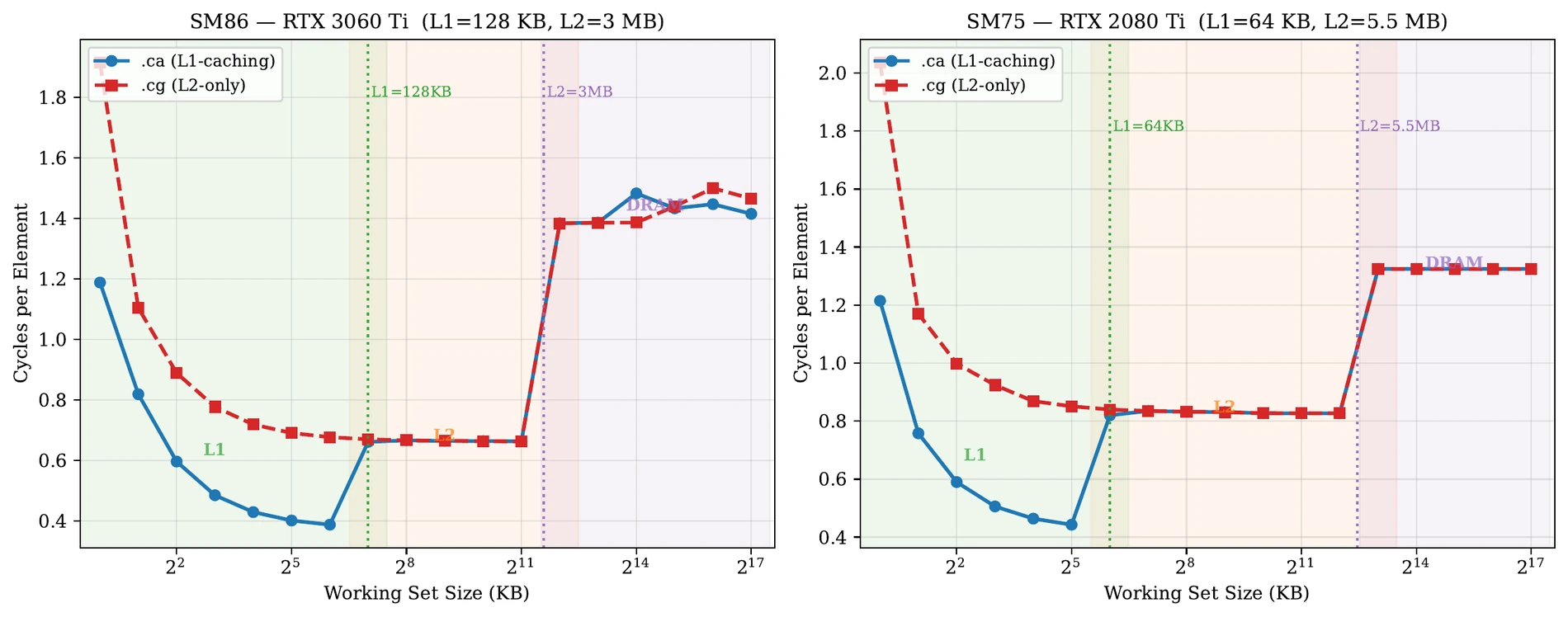
.ca with the L1-bypassing .cg.The second method is completely different: stream through a buffer as fast as possible and measure cycles per element. While the buffer fits in L1, .ca (blue) gets cheaper and cheaper, down to about 0.4 cycles per element, while .cg (red), which never uses L1, levels off around 0.67. As soon as the buffer outgrows L1, the two lines merge, because both are now served by L2. Past the L2 size both jump again, to DRAM.
Two unrelated experiments, a dependent chase and an independent stream, find the same three tiers with edges in the same places. That is what lets me trust the numbers.
8. All four modifiers, warp by warp
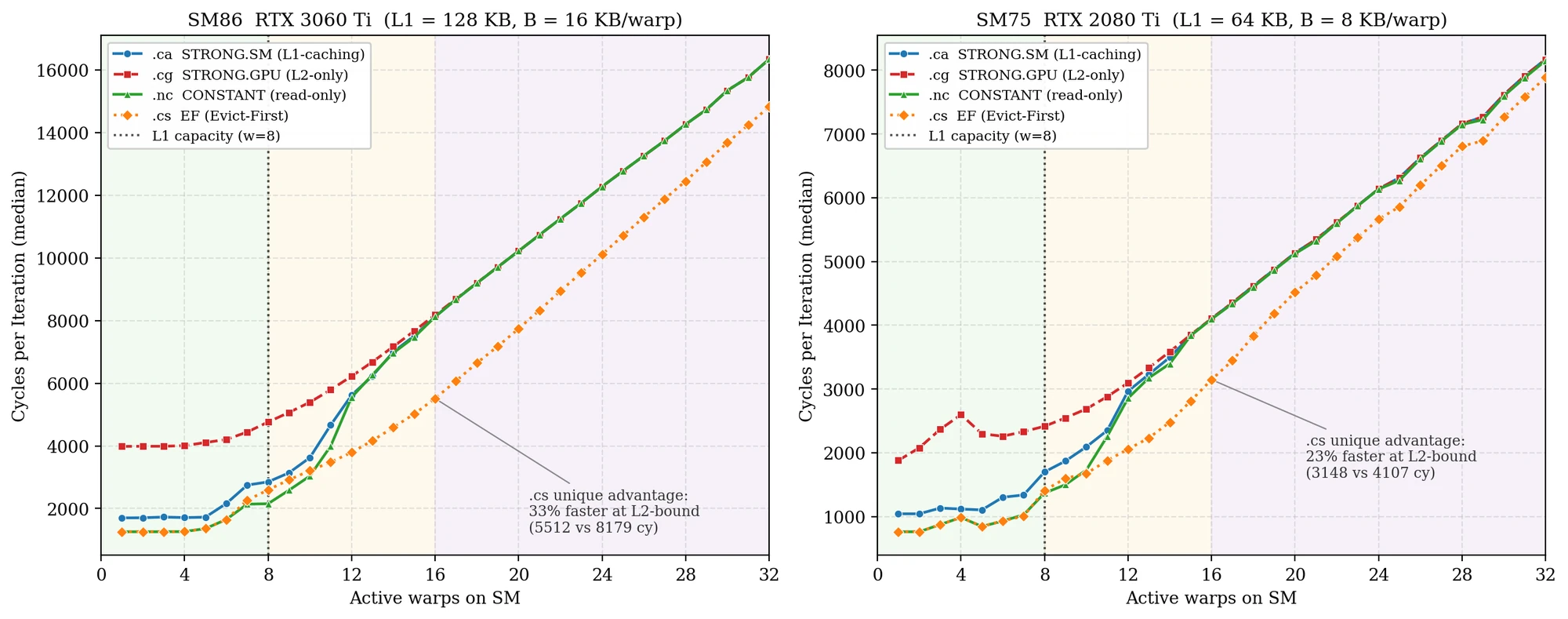
How to read it. Each line is one modifier. Moving right adds warps to a single SM; every warp reads its own block of data, so the total working set grows with the warp count. The dotted line at 8 warps is where the working set equals L1.
Left of that line, the data fits in L1. .nc (green) and .cs (orange) are cheapest at about 1,250 cycles, the default .ca (blue) is at about 1,700, and .cg (red), which refuses to use L1, sits at about 4,000 because every load goes to L2.
Right of the line, L1 overflows and the ranking falls apart. .ca, .nc and .cg converge onto one line, because now they are all paying for L2. .cs is the exception: marking lines evict-first keeps it ahead, 33 % faster at 16 warps on the RTX 3060 Ti (5,512 against 8,179 cycles) and 23 % faster on the RTX 2080 Ti (3,148 against 4,107). The knee moves with the L1 size on both cards.
So "which modifier is fastest" has no single answer. It depends on whether the working set fits in L1.
9. One SM is not the whole chip
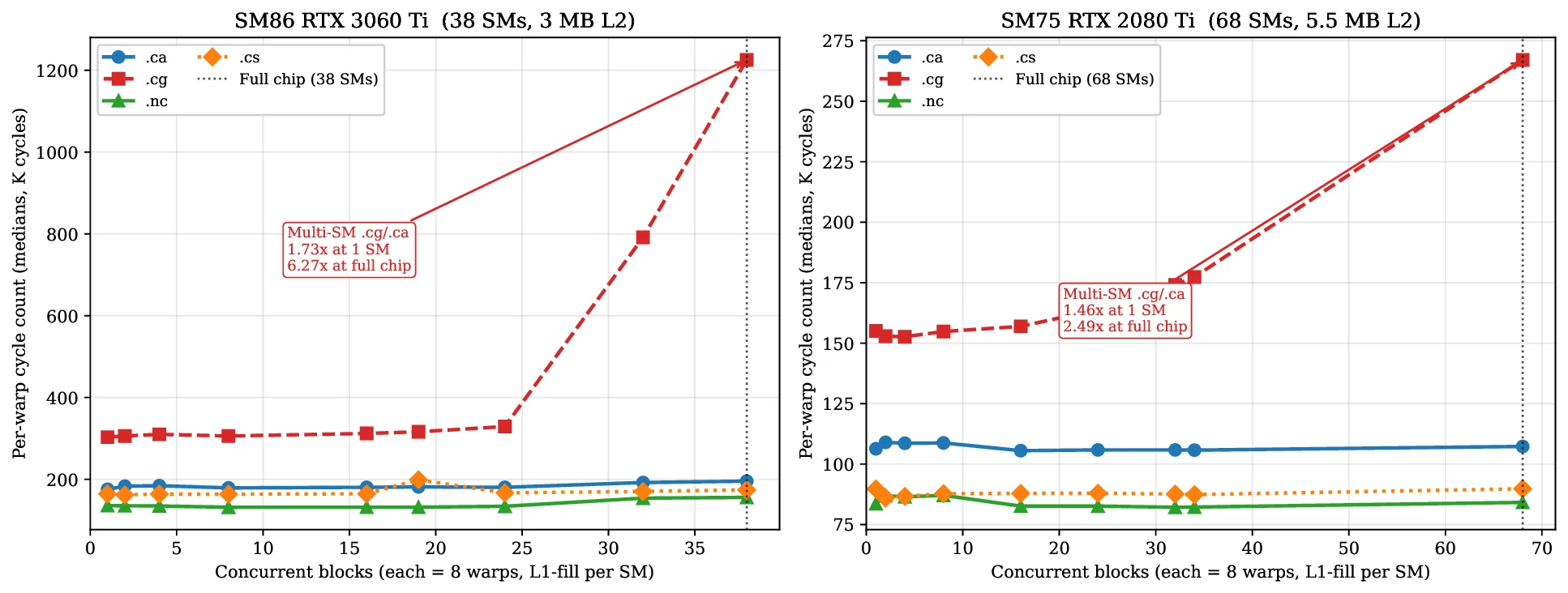
Most microbenchmarks run on one SM. This figure asks what happens when the whole chip runs the same thing.
How to read it. The x-axis is the number of blocks running at once, one per SM, up to the full chip (38 SMs on the 3060 Ti, 68 on the 2080 Ti). The y-axis is how many cycles each warp needs.
.ca, .cs and .nc (blue, orange, green) stay flat: each SM's data lives in its own L1, so adding SMs changes nothing. .cg (red) bypasses L1, so every SM is hammering the same shared L2. It stays flat up to about 24 blocks, then climbs steeply to about 1.2 million cycles per warp at full chip.
On one SM, .cg costs 1.73× as much as .ca. That is the number a single-block experiment would report. At full chip it costs 6.27×. The RTX 2080 Ti goes the same way, from 1.46× to 2.49×; its larger L2 and greater number of SMs soften the effect.
The lesson is that .cg is not just "a bit slower": its penalty grows with how much of the chip is busy. A measurement on one SM understates the cost in production.
10. When the two instruments disagree
| Warps | Working set (KB) | L1 hit % | L2 hit % | DRAM sectors | clock64 cycles |
|---|---|---|---|---|---|
| 1 | 16 | 98.43 | 68.4 | 1,000 | 1,701 |
| 2 | 32 | 98.43 | 95.7 (noise) | 1,436 | 1,705 |
| 4 | 64 | 98.43 | 53.9 | 2,204 | 1,711 |
| 6 | 96 | 98.43 | 60.4 | 3,240 | 2,290 (+34 %) |
| 8 | 128 | 78.95 | 90.5 | 4,256 | 2,388 |
| 16 | 256 | 0.00 | 98.1 | 9,292 | 8,158 |
| 32 | 512 | 0.00 | 98.1 | 17,364 | 16,270 |
| 32 | 4,096 | 0.00 | 0.14 | 8,382,328 | – |
NCU counters and clock64 timing from the same kernel, live on the RTX 3060 Ti.
How to read the table. Each row is one configuration. The middle columns are NCU's view: what fraction of loads hit L1 and L2, and how much traffic reached DRAM. The last column is the cycle count from inside the kernel.
Mostly the two agree. From 1 to 4 warps the data sits in L1 (98.43 % hits) and the timing barely moves. At 8 warps L1 fills and the hit rate drops; at 16 and above nothing hits L1 and the cycles jump.
The highlighted row is the interesting one. At 6 warps NCU says nothing has changed: L1 hits are still exactly 98.43 %. But the cycle count is 34 % higher. Same tier, higher cost. The explanation is L1 bank conflicts: the data is still in L1, but more warps are now competing for the same banks. NCU alone would have missed it, and the cycle counter alone could not have said the data was still in L1. Only the combination finds it.
11. The decision map
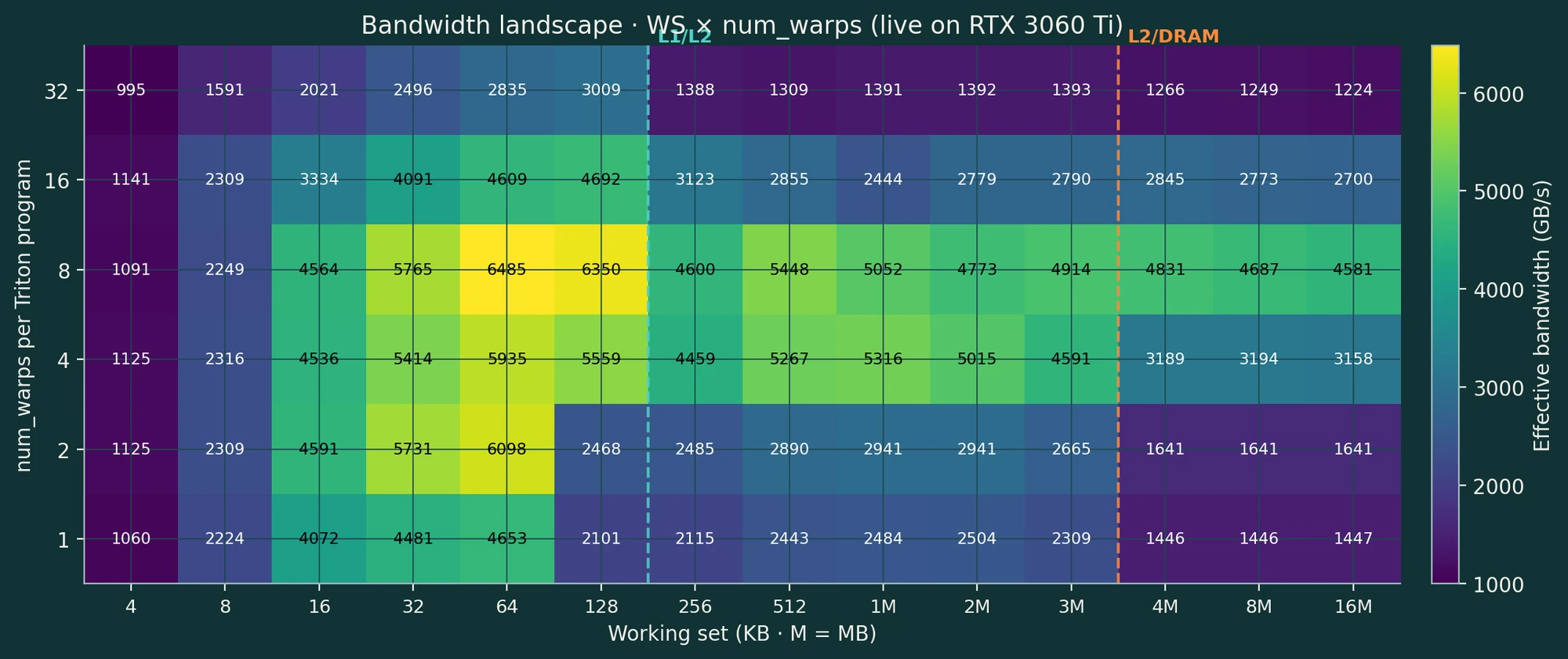
The last result is a practical one: for a given working set, how should a kernel be configured?
How to read it. Columns are working-set sizes from 4 KB to 16 MB; the dashed lines mark where L1 and L2 run out. Rows are the number of warps per Triton program. Each cell is effective bandwidth, the bytes the kernel reads divided by its run time, so it can exceed the 448 GB/s of DRAM when the data sits in cache. Brighter is faster.
The best cell is 6,485 GB/s, at 8 warps and a 64 KB working set. The 32-warp row is poor everywhere, which points at occupancy and bank pressure. Across the map, bandwidth ranges from 995 to 6,485 GB/s, a spread of about 6.5×. That is as large as the worst modifier penalty in section 9, so the configuration deserves as much attention as the choice of modifier.
Where the idea came from
The method came out of supervision meetings with Martin Berger, which were mostly about CPUs: how prefetching hides memory latency, why pointer-chasing workloads are bound by latency, and the idea of treating a whole chain of loads as one timed "mega-instruction". Moving to the GPU was mostly a translation: the CPU's RDTSC became clock64 read with CS2R, and the mega-instruction became the pointer chase in section 7, one load at a time.
The principle I took away: bracket one instruction, time it precisely, and sweep the structure around it.
Limitations
- Synthetic benchmarks. These are single-load microbenchmarks. Real kernels need their access patterns matched before the numbers apply.
- Timing per warp, not per load. The brackets time a warp's loads together.
- Not a full factorial sweep. Block size and occupancy were controlled, not swept.
- One GPU at a time. No NVLink, no multi-GPU.
.ncneeds CUDA. It cannot be reached from Triton.
What I would stand behind: the SASS mapping of each modifier, checked with cuobjdump, and the three-tier structure, found by two independent methods.
What came next
The slides ended with two directions. One was newer hardware: on Hopper (H100), L1 grows to 256 KB per SM and L2 to 50 MB, so the region where the modifier matters gets wider. The other was the compiler: expose all four modifiers in Triton, and let it pick one automatically from the working set and warp count, using a cost map like the one in section 11.
What actually happened next is tickbound. The bracket in section 6 only works when you write the timing code by hand. tickbound patches the same kind of timers into a kernel's compiled SASS, checks that the kernel's own instructions are untouched, and extends the clock from one SM to eight GPUs on one host clock, with a stated bound on every number.
The full slides are here (PDF, 3.5 MB).